Showing posts with label organize. Show all posts

31 January, 2012

Organizing series round up

Here at SAS-does, January was the month of ORGANIZE.  I shared several tips on how to organize you recipes, your ideas, and your online "stuff".  I will continue posting more about organizing throughout the year.  In fact, I created a special tag for this series (click here or look through the series column on the left-hand side).  I also have an ORGANIZE Pinterest board that you can follow.


Today I want to share my favorite organizing ideas found online:


    26 January, 2012

    Organizing your online "stuff"

    Today I want to share my tips on organizing your inbox, lists of favorite websites, and online bookmarks.  How can you keep all this online "stuff" under control and be able to find what you need in no time?


    EMAILS
    I do not like having multiple email addresses so my inbox gets full quite fast with work-related messages, personal emails, newsletters and occasional promotional info.  I've discovered 2 things that make it easier to overcome inbox clutter: creating multiple folders/labels and using filters.

    Divide and conquer: No matter which email service you use there is an option of creating categories within your inbox: some services call them folders, others refer to them as labels.  Take a look at your regular messages and thing about broad categories you can divide them into:
    - work
    - family
    - friends
    - contacts (emails with important contact information)
    - accounts (welcoming emails from online services)
    - links
    Now go through your emails and apply corresponding label or drag it into on of the newly-created folders.

    Use filters:

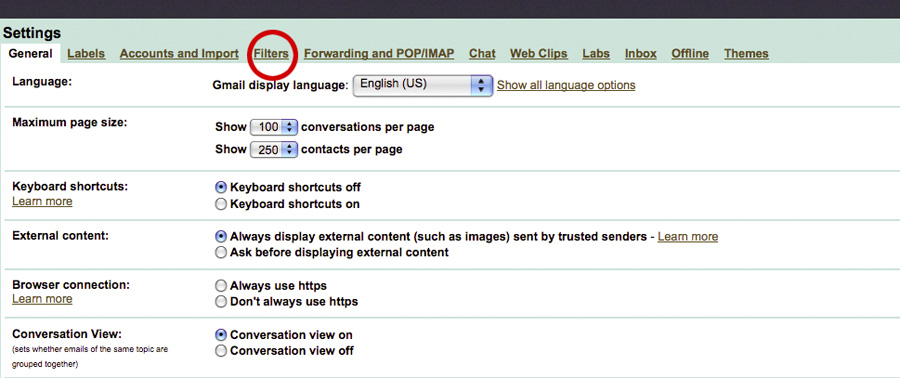
    To "automatise" this for your future emails take a look at "filters" in your email settings.  Filters allow you to set up new rules/chain of actions for incoming messages.  Find a way to "pick out" an email you want (ex. from a particular address or containing a particular word in a subject line) and decide which folder you want it automatically be moved to.
    The process is quite simple and you can set up multiple filters to manage most of your incomings.


    BLOGS

    I use BLOGLOVIN to keep track of my favorite blogs.  The website allows to organize blogs that you follow into groups/topics.  You can also "like" any particular post - saving it in your favorites for the future reference.


    is another helpful online organizing tool.  Simply put it's a visual pinboard where you can "pin" (save) your favorite web pages, that contain images or you can upload your own images.   I use PINTEREST to keep track of craft projects I want to try, recipes I want to cook, and other interesting, useful, and fun pages.


    FAVORITES

    I also use DELICIOUS to save useful pages (usually those without images) and the good ol' "favorites" option of my browser.

    What's your secret for keeping online "stuff" under control?

    Click here for more organizing ideas from SAS-does

    20 January, 2012

    Idea organizing

    Since January is a month of organizing, I want to share with you my method of organizing ideas.


    I find that using 3 small notebooks helps me to organize not only my work and school-related schedules, but also my creative ideas and my blogging "stuff".

    Here is what I use:


    1. AGENDA
    I do not have a fixed weekly schedule, instead I hold several part-time jobs and my teaching schedule varies throughout the semester.  So I find having an agenda/weekly planner to be extremely useful. This year I decided to make one myself (tutorial coming up) and this cute red and pink notebook holds all important dates, deadlines and appointments.
    I find it useful to use pencil rather than pen in my agenda - this way I can "move" things around easier, keeping pages (more or less) "organized".


    2. IDEAS NOTEBOOK
    Do you remember recycled notebook I've made in October? Well I am using a similar one as my Ideas Notebook. The size makes it perfect for caring around and I use it to write my "to do" lists, phone numbers, ideas that pop in my head throughout the day, shopping lists ...
    Once I go through all the pages in this notebook, I will make a similar one to use next month.  Oh, and I will definitely share a tutorial for the new type of binding I use.


    3. BLOG PLANNER
    I bought this agenda on a whim, while gift shopping in December.  At that time I had no clue it would become an essential part of my idea organizing package.  Now, I use it to plan everything blog-related.  I schedule my posts in the monthly preview and use the rest of the month pages to jot down topics and to sketch post content.  I also have blog outline and plan upcoming series on the "notes" pages of this agenda


    How do you keep organized? Where do you store all your favorite ideas?

    Pin It


    Click here for more organizing ideas from SAS-does,
    Last year, Anya was blogging about Travelling Album

    06 January, 2012

    Recipe organizing

    When I moved out from my parents and began cooking (almost 10 years ago) my recipe collection consisted of 1 cookbook and a couple of handwritten notes.  As my passion for cooking grew so did my collection.  I would buy several cooking magazines every month and soon had no space to store them all.  So I decided to keep only recipes and get rid off all ads and uninteresting (to me) articles.  The pile of magazines shrank significantly but I was still not happy with the recipe storage solution.
    Until I learned a neat trick of using 3-ring binders for recipe organization.  I bought several binders and slid recipes in sheet-protectors.  Binders got labeled: APPETIZERS, SOUPS AND SALADS, PASTA etc.

    This organizing "system" served wonderful for several years until I began noticing that I do not refer to those recipes as often as I used to.  Instead, I get recipe ideas while reading cooking blogs or going through the most recent issue of my favorite magazine.  So this year I came up with a new organizing technique.


    1. For online recipes I use my Pinterest "TO COOK" board.  Recipes I've tried and enjoyed get pinned onto "TRIED AND TRUE" board
    2. For paper recipes I still use a couple of binders, keeping only interesting ones that are not available online
    3. Every month I make a list of seasonal recipes I want to cook and write down where they come from.  Now, when I need a recipe all I have to do is pick one from the list and find it either online or in my binder ... Easy and fast!


    If you like this organizing idea here are free printable cards I created this month.  Each card measures 4x6 and could be printed out in colour or in black-and-white.  


    To download cards in .pdf format
    • click on the image you like
    • on the new GoogleDoc page click "File" tab (left side)
    • select "download original"

    Here are other ideas for organizing your recipes:
    8 FOOLPROOF METHODS from Real Simple
    ORGANIZING RECIPES IDEAS from CheapEats
    3 WAYS TO STORE ONLINE RECIPES from Simple Bites
      Hope this helps you conquer the ever-growing pile of recipes.  Or maybe you have your own way of organizing - please share in the comment section!


      Pin It

      04 January, 2012

      Word of the month

      Back in 2007, Ali Edwards started a tradition of picking one little word in the beginning of January.  This little word would sum up the "goal" of the new year ...  a sort of New Year resolution:
      Last year I began a tradition of choosing one word for myself each January – a word that I can focus on, mediate on, and reflect upon as I go about my daily life. Last year my word was something I wanted to bring into my life in a more tangible way.                                                                                                      Ali Edwards
        
      Today the concept of one little word is extremely popular among bloggers.  It's fun to read how one small word guides people's projects, brings hope, help, and meaning to some while becoming an inspirational source to others.

      This year I've been contemplating a thought of choosing a word for myself, but it seems too impossible to narrow all my ideas down.  So after some hard thinking I decided to pick one word for every month.  Instead of having one little word I will get to play with 12 tiny ones.  And I promise to share all of this with you.

      My word for January is 


      These days I am trying to organize my house, my time, my creative ideas, my school and my work.  I really feel like I need a good, solid structure in order to continue with 2012 and make it an amazing, fulfilling, happy year.

      Did you pick your little word, yet?  What would it be this year/month?